
WizTree vs WinDirStat: Which Should You Use?
Compare WizTree and WinDirStat for large files, duplicate checks and free use. Find the right disk analyzer and see when MangoDisk can help with caches.

Your computer keeps warning that storage is running low, but opening folders doesn't tell you where it all went. Both WizTree and WinDirStat can help you find the files and folders taking up the most space.
For a simple overview of disk usage, either app can do the job. If you also want to check for files with identical contents, try the current version of WinDirStat first. If you're already comfortable with WizTree, there's no need to switch just for the sake of it.
I'm the developer of MangoDisk. If you'd also like to spend less time hunting for caches, it offers another option: disk analysis and common cache cleanup in one app, so you can see what's taking space and review supported cleanup items.
Find your largest files and folders
Forgotten installers, a large video or a folder full of old documents can gradually fill a drive.
WizTree and WinDirStat turn that usage into rectangles of different sizes. The biggest blocks stand out, while the file list helps you check names and locations. Open an item to see what it is before deciding whether to keep it, move it to another drive or delete it.
Try each app on a familiar folder, such as Downloads. Can you find the largest files easily? Can you match a block to its entry in the list and open its location? Those details are more useful than a long feature checklist.
If rectangles don't work well for you, current WinDirStat releases also offer other views, including a sunburst chart. They give you another way to follow the folder hierarchy. If WizTree's treemap and file list already make sense to you, you can keep using them.
Be careful with claims that one app is dozens of times faster. One speed comparison on WizTree's site uses the much older WinDirStat 1.1.2. WinDirStat's scanning has since improved, so those results don't tell you which current app to choose.
Check what a duplicate match actually means
Perhaps you've downloaded a photo several times or made copies of a document and forgotten which ones you still need.
Here's a useful difference: WizTree finds files with matching details such as name, size and date; WinDirStat can check the file contents too.
Two files called backup.zip can have the same size without containing the same documents. WizTree's matches help narrow the search, but you still need to check before deleting. Its official notes make clear that it doesn't compare file contents.
If finding identical copies is your main goal, start with current WinDirStat. Watch for results labeled “Probable duplicates”: an optional setting checks only parts of large files, so those matches need further verification. The duplicate detection guide explains the distinction.
Even identical copies can serve different purposes. A backup or a file referenced by another project may need to stay where it is. After checking the contents, check the location and whether you still need that copy.
Know what's free for your use
Both apps offer free use for organizing files on your own computer.
WizTree is free for personal use. Using it in a commercial environment, such as a workplace, requires the appropriate license under its official terms.
WinDirStat is free and open source. If publicly available source code matters to you, that's a clear reason to choose it.
You don't need to learn every feature at once. Start with the task you want to finish:
| What you want to do | Where to start |
|---|---|
| Find the largest files and folders | Either app; choose the view you find easier to follow |
| Find copies with identical contents | Current WinDirStat; check any “Probable duplicates” labels |
| Use a free, open-source Windows analyzer | WinDirStat |
| Keep a familiar WizTree workflow | Stay with WizTree; check licensing for work use |
| Review common browser and app caches together | Consider MangoDisk's Deep Cleanup |
Review common caches with MangoDisk
Large videos and old installers are often easy to recognize. Caches can be harder to find: they're scattered across app folders, and the folder names don't always tell you what they contain.
MangoDisk's Deep Cleanup groups supported caches by category. You can review their paths and estimated reclaimable space before selecting anything, without searching through each hidden folder yourself.
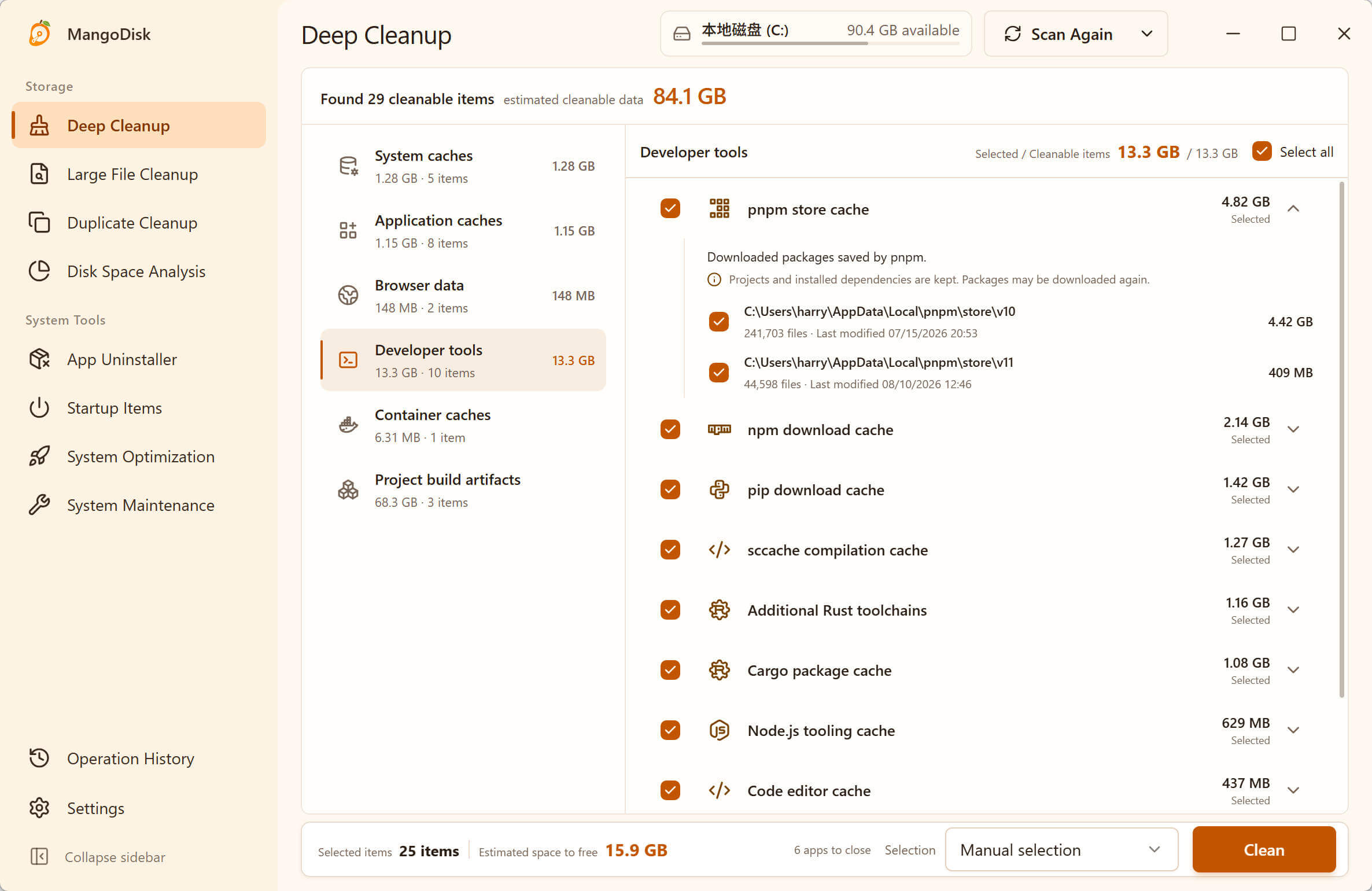
This is an example scan. The figures and selections aren't default recommendations or space already recovered.
The distinction matters: a usage chart shows where space is going; a cleanup list helps you review recognized items you might remove. A large app folder isn't necessarily all cache.
WinDirStat can delete files and open Windows cleanup and uninstall tools. MangoDisk is worth trying when you'd rather have common caches grouped by purpose, with less time spent finding their locations and looking up what they are. If you only occasionally need to find a large file, your familiar analyzer may be enough.
MangoDisk is free and open source, runs on Windows, macOS and Linux, and needs no signup or login. Scanning doesn't automatically delete files. Deletion in Disk Space Analysis, Large File Cleanup and Duplicate Cleanup is permanent and bypasses the Recycle Bin or Trash; read the cleanup safety guide before removing anything.
You can download MangoDisk to see what's using your space. The source code and issue tracker are on GitHub. If you're considering switching tools, the WizTree alternative guide and WinDirStat alternative guide cover when MangoDisk may fit your needs.
This comparison covers the Windows versions of WizTree 4.33 and WinDirStat 2.9.3, with features checked on October 15, 2026.