
An Open-Source AppCleaner Alternative for Mac
Considering an AppCleaner alternative? Use MangoDisk to compare Mac app sizes, review related files and keep the settings and data you need before uninstalling.

Looking for an open-source AppCleaner alternative? MangoDisk is worth a look. Its App Uninstaller puts installed apps, estimated sizes and running status in one list. Decide which apps to remove, then review the related files you want to remove with them. Free and open source, with no signup or login.
It's useful when your Mac still has trial apps, tools you've replaced and software you haven't sorted through in a while. See what's installed, choose what you no longer need, and check its caches, settings and local data before uninstalling.
When does switching from AppCleaner make sense?
AppCleaner has a straightforward workflow: drop an app onto its window, let it find related files, then choose what to delete. If you occasionally remove one app and like that approach, keeping AppCleaner makes sense.
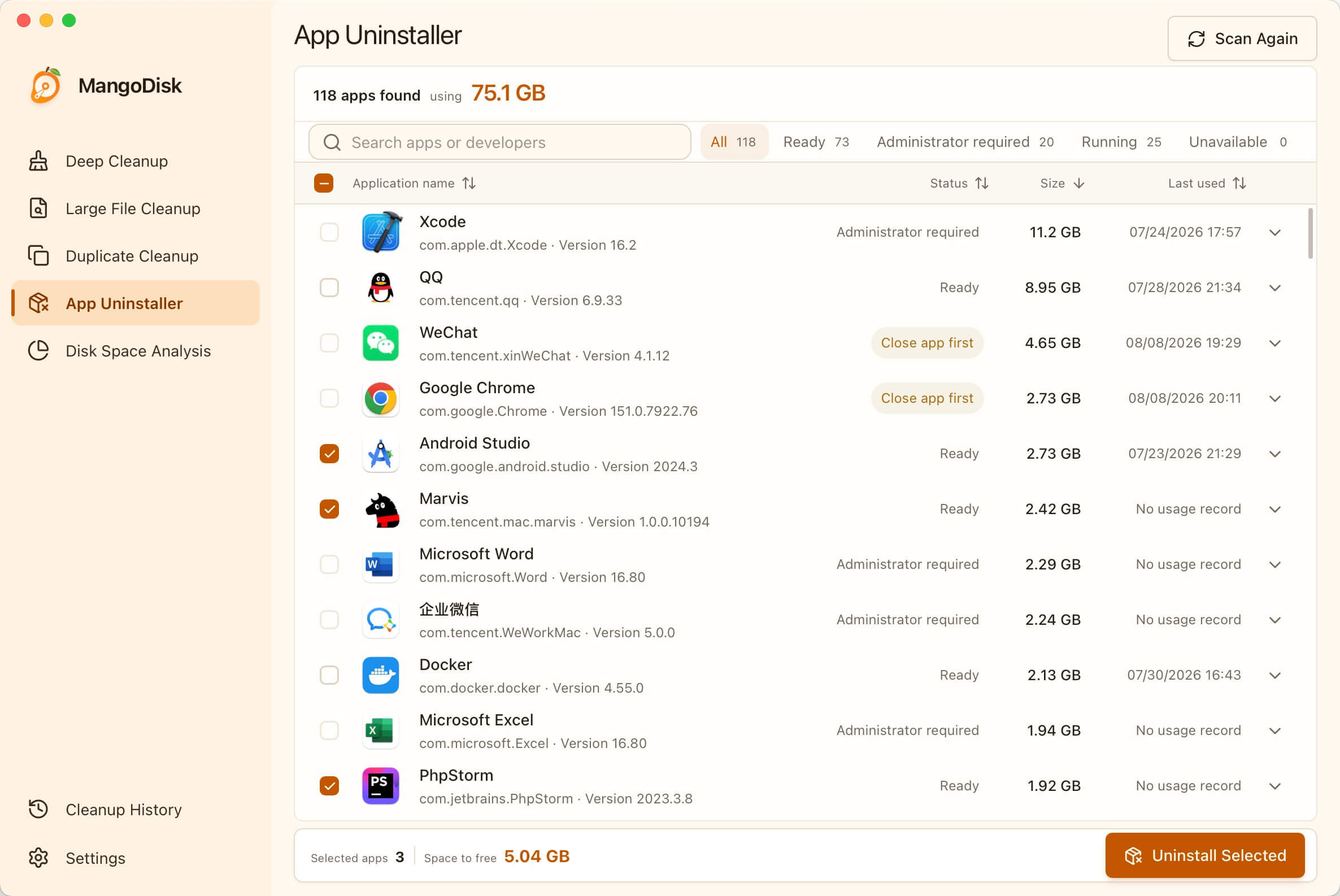
MangoDisk's list view is useful when you want to review several apps or haven't decided what to uninstall yet. Compare sizes, search by app or developer, and inspect the items you plan to remove.
Perhaps you tried several tools that do the same job and now use just one. Or your trial apps have piled up and you can't remember which you still need. The app list gives you a place to start with the ones you've already decided to stop using.
The benefit is less time spent looking things up in separate places. App storage, running status and related files are together, making the decisions before an uninstall easier to work through.
Compare your apps before choosing what to uninstall
Scan in MangoDisk's App Uninstaller, then sort by size or search for an app or developer. Start with software you know you no longer use, without checking each app's size separately in Finder.
Last-used information can help jog your memory. An old date or a missing record doesn't prove an app is unnecessary: a tax app or a work tool you only open occasionally may still be worth keeping.
Select several unwanted apps, then review their related files individually. The list also shows when an app is running. Save your work and quit it completely before uninstalling.
If you like AppCleaner's direct approach but want more help reviewing your installed apps first, MangoDisk is an option to try.
Review related files and keep settings or data you need
An app may store caches, logs, preferences and local data in different locations. MangoDisk checks for files it can associate with the app. Expand the app to inspect those items, their locations and sizes, and adjust your selection.
This is useful when you don't need an app now but might reinstall it later. Check which items are disposable caches and which contain settings or files you want to keep.
| Related files | What to consider before uninstalling |
|---|---|
| Caches and logs | Consider removing them if you no longer need them or the logs for troubleshooting |
| Preferences and configuration | Keep or back them up if you want to reuse your setup later |
| Templates, saves and other local files | Inspect the contents and back up important data before deciding |
If you're unsure about a folder, open its location and look inside. MangoDisk lists the related items it identifies; you decide what stays and what goes.
MangoDisk permanently deletes the selected Mac apps and related files you confirm. They do not go to the Trash. Back up valuable settings and files, and deselect anything you're unsure about. Read the App Uninstaller guide and safety guide before proceeding.
AppCleaner or MangoDisk: which fits your needs?
Choosing an AppCleaner alternative comes down to how you want to manage apps.
| What you need | What makes sense |
|---|---|
| You know which app to remove and like dropping it into a window | Keep using AppCleaner; finding related files is already part of its job |
| You want to browse installed apps and compare sizes before choosing | Try MangoDisk's App Uninstaller |
| You want public source code and disk usage analysis in the same app | MangoDisk provides both |
MangoDisk's source code is public, so you can inspect its implementation and follow development. App scanning and removal run locally and don't require AI.
If your next question is why storage is still full after uninstalling software, MangoDisk's Disk Space Analysis can help locate larger folders. See how to find large files on Mac. Inspect what you find rather than assuming it's all app leftovers.
Use the developer's uninstaller when one is provided
Some apps install drivers, extensions or other system components. Apple recommends using an app's own uninstaller when available to remove components stored elsewhere. MangoDisk also cannot guarantee that it will find every related file for every app.
For a closer look at app files, related data and personal documents, read uninstalling Mac apps and reviewing leftovers. More related guides are in the Mac articles collection.
If you want an open-source AppCleaner alternative that helps you review your app list before deciding what to remove and what to keep, download MangoDisk and try App Uninstaller.